The bus records itself while you are away.
Preview The KNX box is a Raspberry Pi that writes down every telegram around the clock and opens its own Wi-Fi. You set it up with the app: today with the Linux app, soon by QR code with iPhone, iPad and Android. No Home Assistant and no internet.
What you need.
About half an hour at your desk to prepare it, no Linux knowledge needed.
- Raspberry Pi
- Pi 4 (tested) or Pi 5 with a matching power supply (Pi 5: 27 W USB-C), details under Hardware
- SD card
- microSD of 16 GB or more and a card reader for your computer
- Computer
- Windows, Mac or Linux with the free Raspberry Pi Imager
- Network cable
- From the Pi to the router or switch the KNX IP gateway is on; not needed for the bus with the kBerry
- Gateway
- One free tunnel slot, Home Assistant or ETS often take one already. Or the kBerry plug-on module instead of a gateway
- App
- Today the Linux app, soon also iPhone, iPad and Android
- Printer
- Optional, for the sheet with the two labels and access details
Prepare it once, then just pair.
Image and label are made once at your desk. On site it then takes a cable, power and the app.
- Download
- Get the image (button at the top, file
knx-box-….img.xz). Don’t unpack it, the Imager reads it as it is. - Write
- In Raspberry Pi Imager: choose the device (Pi 4 or Pi 5), under operating system at the very bottom “Use custom” and the downloaded file, then the SD card. Answer the question about customisation with “No”: the box sets up its name, Wi-Fi and passwords itself.
- First start
- SD card into the Pi, connect power; no network cable needed yet. After a few minutes the Wi-Fi “KNX-Box-…” appears. Wait one more minute, then unplug the power.
- Read the card
- SD card back into the computer, print
knx-box-en.pdf(German:knx-box-de.pdf). The sheet has everything: two labels to cut out (1 for the app on top of the box, 2 with the Wi-Fi on the bottom), Wi-Fi and box password, the link for the Linux app and the next steps. Keep it safe, then put the card back into the Pi. Next to it are the QR codes as images (knx-box-app.png,knx-box-wlan.png), the link asknx-box-link.txtand the values inknx-box.txt. - Connect
- Network cable to the router or switch at the gateway, then power. After about a minute the box is ready.
- Pair
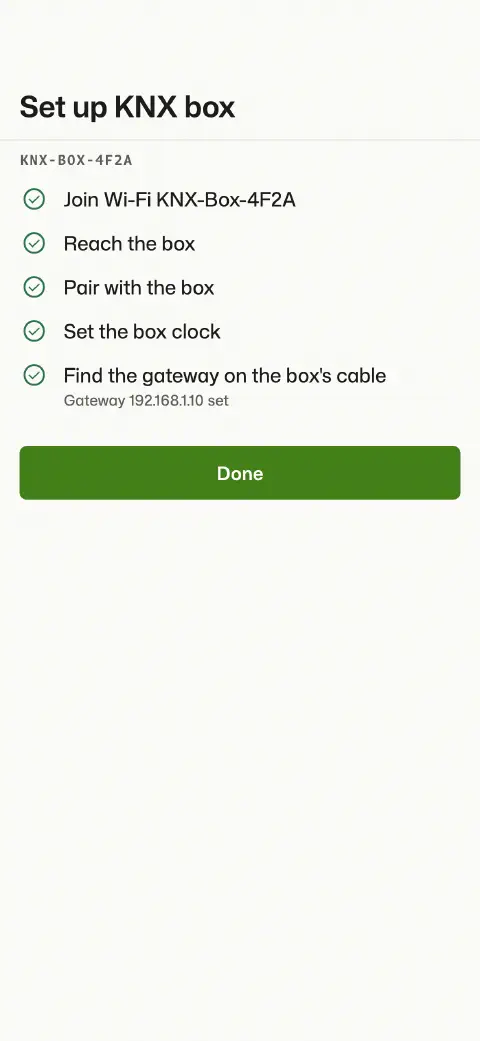
- In the app, “Add KNX box” and scan the label. The app joins the box’s Wi-Fi, pairs, sets the clock and looks for the gateway. If there is exactly one, it is set right away and the box records.
- With Linux
- Get the Linux app, unpack it and run
./install.shin thebundlefolder: it installs Busclear to the app menu, then the download can go. On the computer, switch to the Wi-Fi “KNX-Box-…” (Wi-Fi password fromknx-box.txt). In the app, “Add KNX box” and paste the contents ofknx-box-link.txt; the app does the rest as above. - Without app
- It works without the app too: the second QR code (
knx-box-wlan.png) joins the box’s Wi-Fi, then openknx-box.localin a browser and sign in with the box password.
What the app puts on the box for you.
Everything the box needs to know comes from the app. There is nothing to copy.
- Gateway
- The box finds it on its cable; if there are several, you pick one in the app.
- ETS project
- Import it in the app and it goes onto the box too. Then the box knows names, datapoint types and the time master.
- Keyring
- For KNX Secure the same: the box records secured telegrams readably.
- History
- The app shows it straight from the box, day by day, with replay and export.
- Storage
- On a USB SSD named
KNXBOXDATA, otherwise on the SD card, unencrypted either way. At five telegrams a second about 43 MB a day, raw.
Starts by itself, never stops.
As soon as a gateway is set, the box records. There is nothing to start and nothing to forget.
- Always on
- One tunnel stays open, every telegram goes into a daily file, even with no device connected.
- Clock
- Without internet: the box sets its clock from the iPhone or iPad that connects, or from the KNX time master on the line (DPT 19.001, 10.001 + 11.001).
- Until then
- The box already records and puts the time right afterwards. Or it waits, if you switch on “Record only once the time is right”.
- Power cut
- After the restart the box reconnects and carries on; at most the last seconds are lost. Without a real-time clock the clock starts from the last saved stamp (at most about 15 minutes behind) until it is set; until then the box packs and deletes nothing by age. The system journal and the reason for the last restart are kept.
- Retention
- Seven days by default, up to ten years.
- Pause
- Frees the tunnel, for example when ETS needs the gateway’s only slot.
Over IP or straight on the bus.
The box sits on a network cable to the KNX IP interface or IP router. Since 1.8.4 it can also sit right on the line: with the kBerry plug-on module, no IP gateway at all.
- IP
- KNXnet/IP tunnelling or routing, KNX IP Secure included. The box takes one tunnel slot on the gateway.
- TP with kBerry
- The bus cable goes straight to the box: through the Weinzierl KNX BAOS 838 kBerry, a module that plugs onto the Pi’s pin header. Connection mode “KNX-HAT (kBerry)” in expert mode. No gateway needed, no tunnel slot taken.
- Guide
- Preview: how the kBerry goes onto the Pi, how to prepare the Pi and how to assemble the matching case: guide for tinkerers (PDF, German, preview).
- Bus monitor
- Over TP the box also sees what a tunnel never shows: acknowledgements (ACK, NAK, BUSY) and repeats. It cannot send in this mode.
- Address
- To listen, the box needs no individual address and no ETS programming.
- Status
- Preview: tested on a Pi 4 on a real bus, not yet on the Pi 5 or in continuous use. More in the issue on GitHub.
What goes into the case.
- Computer
- Raspberry Pi 4 (tested) or Pi 5 with 2 or 4 GB; a Pi 3 with a 64-bit system is enough for recording
- Clock
- Recommended for the Pi 5: the RTC battery. Then the time is right even before the first iPhone. The Pi 4 has no clock; the image does not set up a DS3231 module by itself.
- Power
- 27 W power supply (USB-C); weaker ones crash under load
- Check
- Under “Raspberry Pi” the box settings show the temperature and its maximum since start and warn about under-voltage or throttling, even in a closed case without SSH.
- Storage
- USB SSD or NVMe, 128 GB last for years
- Case
- Preview: printable case (STL, zip) for Pi 3B to 5 with the kBerry: slim lid, module bridge, USB cover, a DIN rail base with a screw-on spring clip (recommended: variant 1, still being refined) and test prints for the heat-set inserts and the lid. Print at 0.2 mm layer height. Description (German) in the README.md inside. The fit has only been checked on the model so far.
- The rest
- A network cable, the two labels from the sheet; for the direct bus connection the kBerry plug-on module
A preview, to be honest.
The image is built automatically and runs in the test setup and on a Raspberry Pi 4 on a real bus. Nobody has tried it in continuous use on a real site yet. Reports are very welcome.
- App
- The box works with the app: setup, project and history go through it, the browser is only a stopgap (see Setup). iPhone, iPad, Android, Mac and Windows arrive in the coming weeks; until then use the Linux app.
- Gateway
- A gateway with a fixed address straight on the box’s cable does not work yet; that needs the switch.
- Wi-Fi
- The app joins by itself on iPhone, iPad and Android 10 or later; on Linux, Mac and Windows you join once yourself.
- Alarms
- Without internet there are no notifications to your phone.
- Feedback
- Bugs and experiences are welcome as an issue on GitHub.
Common questions about the box
Do I need a PC?
Once at your desk: to write the image, read the SD card and print the QR code. Until iPhone, iPad and Android arrive, you pair the box with the Linux app; after that a phone or tablet is enough on site.
Do I need Home Assistant?
No. The box runs the same software as the Home Assistant add-on, just as a device of its own. If you run Home Assistant OS, the add-on is the better choice. With Home Assistant Container the “Busclear” integration connects the box.
Which Raspberry Pi is enough?
The Raspberry Pi 4 is tested. A Pi 3 with the 64-bit OS should do for continuous recording, but long evaluations take longer there. Pi 2 and the first Pi Zero do not work, there are 64-bit builds only.
SD card or SSD?
Both work; for months of history an SSD is better. The box writes telegrams in batches every 5 seconds instead of one by one, which spares SD cards too. Finished days are compressed, about 20 MB per million telegrams.
Does the box take up a tunnel on the gateway?
Over IP yes, exactly one, around the clock. Every iPhone and iPad in the box’s Wi-Fi shares that tunnel. If ETS needs the only free slot, pause the box. Straight on the line with the kBerry this goes away.
Do devices in the box's Wi-Fi reach the customer's network?
No. The firewall keeps the box’s Wi-Fi apart from the network on the cable. Only INTERNET_SHARING=yes in knx-box.txt lets devices in the Wi-Fi out.
Can the customer reach the box over their network?
No. Over the cable the box does not answer at all by default, only in its own Wi-Fi. For your own box on your own network, turn on “Access via cable” in the app under Box settings, or set LAN_ACCESS=yes in knx-box.txt before the first start.
What if someone walks off with the box?
Whoever has the label can pair. That is why the app suggests setting your own box password right after pairing; after that neither the label nor the SD card pairs new devices. Under Box settings you change it later and revoke devices you no longer need.
How well is the data on the box protected?
Without the box password or a paired device nobody gets at the data or the bus; the password is stored only as a hash on the box. Two limits: project and history are unencrypted on the SD card or SSD, so whoever has the medium can read them. And inside the box’s Wi-Fi the connection has no TLS, so the Wi-Fi password is the real protection there. So don’t leave the box openly accessible. On its own it sends nothing to us; if it has internet, it sets its clock that way.
May I record the bus in a lived-in house?
A bus recording shows when someone is home. Agree on it with the residents and keep the retention as short as you can.