Busclear as part of Home Assistant.
The bus monitor in the sidebar, on every device with Home Assistant. If you like, it shares the connection of your KNX integration instead of an own tunnel, brings triggers for automations and, with MQTT, shows up as a device with entities. Free, with every tool, for one installation.
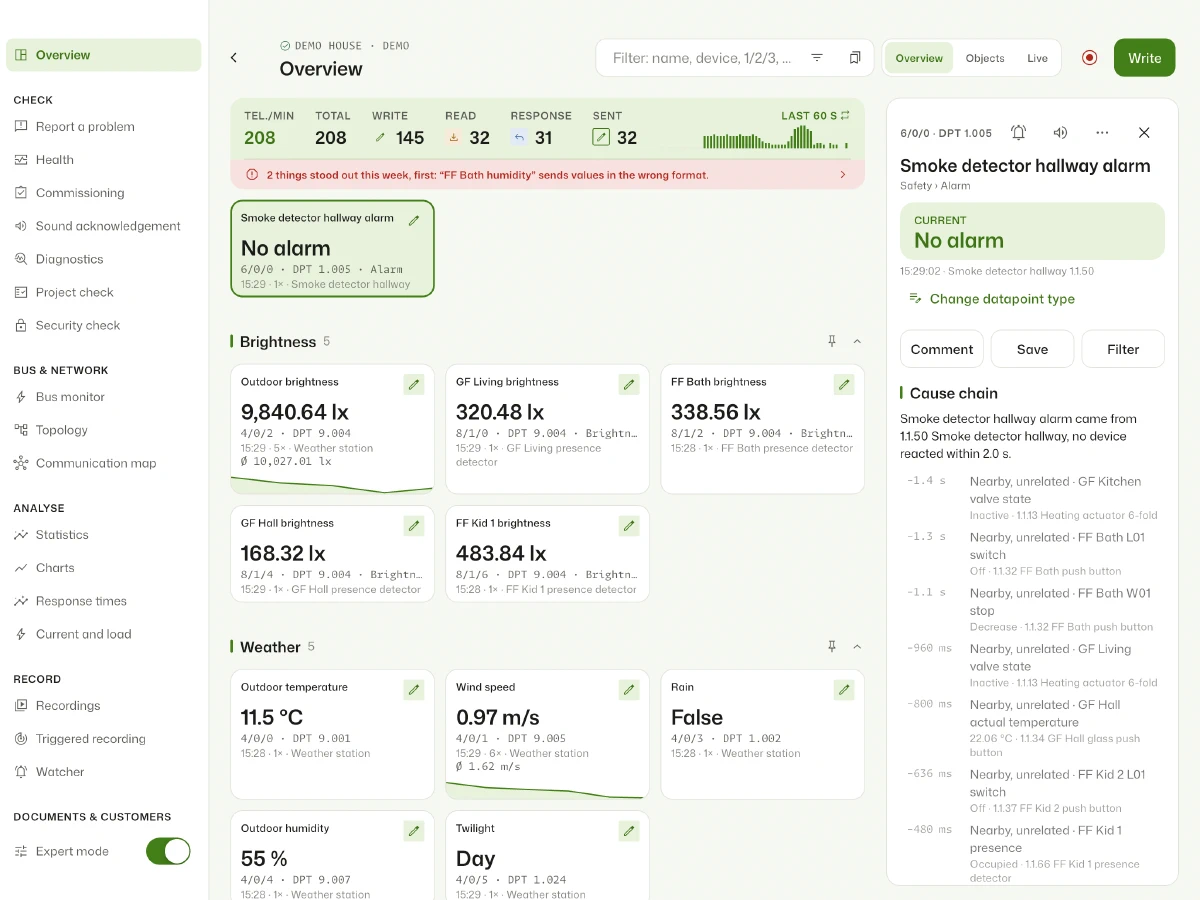
In the sidebar in two minutes.
- Repository
- Tap “Install the add-on” above or in Home Assistant under Settings › Add-ons › Add-on store › ⋮ › Repositories add
https://github.com/regetskcob/KNX-Monitor. - Start
- Install Busclear, start it and turn on “Show in sidebar”. The add-on runs on amd64 and aarch64, so also on Home Assistant Green, Yellow and the Raspberry Pi.
- Connect
- Pick the gateway or share the KNX integration (see Connection). The add-on then stays connected, also without an open browser.
- Project
- Import the ETS project (
.knxprojup to ETS6, also password protected) for names, datapoint types, devices and rooms. The password is not stored.
An own tunnel or none at all.
If the KNX integration is set up, the add-on suggests sharing its connection. That saves a tunnel slot on the gateway.
- Home Assistant
- No own tunnel: the add-on reads what the KNX integration receives and sends via
knx.sendandknx.read. The integration decrypts KNX Secure. - Tunnel
- UDP or TCP, optionally with a fixed tunnel address. Needed for programming mode, address check and the bus monitor with acknowledgements.
- Routing
- Multicast through an IP router, uses no tunnel slot.
- IP Secure
- Secured tunnel with user and password or the keyring from ETS.
Watchers, alarms and the bus as triggers.
The add-on fires events in Home Assistant, also without an open browser. In the automation editor use them as an “Event” trigger, with the integration or MQTT also as device triggers.
- Watcher
- A watcher fires (
knx_monitor_watcher). With name, group address, source and value. Watchers are set up in Busclear under Tools › Watchers. - Alarm
- An alarm or fault object switches on or off (
knx_monitor_alarm), for example a smoke detector or a device fault. Busclear recognises them from the ETS project. - Bus
- The bus connection is lost or back (
knx_monitor_bus). Only real changes are reported, not every connection attempt. - Blueprints
- Import with one click: Watcher, Alarm or fault, Bus connection, High bus load, Low space.
- Notifications
- Without your own automation the add-on reports alarms and watchers as a Home Assistant notification. If you notify yourself, turn that off in the configuration and you get nothing twice.
knx_monitor_watcher- Press a key: the watcher fires and the event shows here.
Busclear as a device with entities.
Two ways, neither needs credentials: the “Busclear” integration via HACS, which Home Assistant discovers when the add-on starts, or MQTT if a broker is set up (usually the Mosquitto add-on).
- Bus connected
- Connectivity, handy for automations with “for 5 minutes” or on the dashboard.
- Recording
- Switch to pause and resume continuous recording, for example when ETS needs the only tunnel slot.
- Bus activity
- Telegrams per minute and today, repeats per minute, last telegram, bus load, open alarms, availability over the last 24 hours and free space, with history and statistics in Home Assistant.
- Device triggers
- One per watcher, plus alarm and fault on and off, bus lost and back. They are in the normal list, no event names to type. The integration also adds conditions (bus connected, alarm open, low space) and event entities.
- Repairs
- The integration reports under Settings › Repairs when the bus is gone for a while, space runs low or a group address that usually sends regularly goes silent. “Ignore” hides the hint until the address sends again.
- Availability
- If the add-on stops, Home Assistant shows the device as unavailable.
Records even when nobody is watching.
- History
- Every telegram goes into a daily file, finished days are compressed. Retention and size are set in the app.
- Gaps
- Once a minute the add-on notes whether the bus was connected. The day list explains gaps, for example “bus disconnected for 3 min”.
- Backups
- History, settings and an imported keyring are part of Home Assistant backups.
- Access
- Only through Home Assistant (Ingress), plus the integration with its own key. Requests from elsewhere in the network are rejected.
What you can set in the configuration.
Under Settings › Add-ons › Busclear › Configuration.
- Read only
read_only: the server sends nothing to the bus, not even read requests. On by default; turn it off to write or read values from the add-on.- Alarms
alarm_notifications: notification for alarms and faults, on by default.- Watchers
watcher_notifications: notification for watchers, on by default.- Push
notify_service: additionally as push through a notify service, e.g.notify.mobile_app_iphone.- Card
dashboard_card: registers the dashboard card “Busclear chart” as a resource, on by default.- Telegrams
mqtt_telegrams: preview, sends every telegram as JSON toknx_monitor/telegram/1/2/3, with name, DPT and value where the ETS project knows them. Off by default; feedback welcome in issue #11.- Secure
mqtt_secure_telegrams: also sends telegrams protected by KNX Data Secure, then decrypted. Anyone who can read the broker sees exactly the values the encryption is meant to protect. Off by default.
Common questions about the add-on
Does the add-on cost anything?
No. The add-on stays free, with all tools and long-term history, for one installation.
Is the add-on open source?
Yes. The source code of the app, the add-on and the Busclear Box is licensed under GPLv3 on GitHub. Everything the server sends to the bus passes one file there. The commercial parts are not included: account, the solution for electrical contractors and the home planning package. Name and logo are excluded, a fork needs a name of its own.
Does the add-on take a tunnel slot on the gateway?
With an own tunnel yes, exactly one, shared by all open views. With the connection mode “Home Assistant” none: it then uses the connection of the KNX integration. For the bus monitor with acknowledgements it releases the tunnel for a while and takes it back afterwards.
Do I need MQTT?
No. Events, blueprints and notifications work without. The integration brings the device with entities and device triggers without a broker; MQTT is the alternative, for example if you already run Mosquitto.
Where is my data?
In the add-on’s data folder on your Home Assistant, unencrypted and part of Home Assistant backups; protect those with a backup encryption key. On its own, the add-on sends nothing to the internet and nothing to us. Data only goes to destinations you set up yourself, such as ntfy, a webhook or InfluxDB. More in the privacy policy.
How much space does the history need?
Little. Finished days are compressed, about 20 MB per million telegrams; the current day stays plain at about 95 MB per million. With 20,000 telegrams a day that is about 12 MB a month. The default is 7 days and at most 1,000 MB, both set in the app.
I upload a changed ETS project. What happens to the history?
Nothing is lost. The history stores raw telegrams; names and DPTs come from the current project when they are shown. After the upload, older telegrams carry the new names too. Only PDF and CSV files exported earlier keep the old ones; an ETS file holds raw telegrams only.
I use ioBroker or a NAS instead of Home Assistant.
The same server also runs as a Docker container, with a password instead of the Home Assistant login and optionally with MQTT, for example for the ioBroker MQTT adapter. Instructions and compose.yaml on GitHub. A native ioBroker adapter comes if enough users want it: vote with 👍.
Is there an own integration?
Yes, “Busclear” via HACS: discovery at start-up, sensors, device triggers and conditions, services for scripts, diagnostics and repair hints. Without Supervisor (Home Assistant Container) it connects to a KNX box or the Docker container through a pairing link with “Manage”.
Something does not work. How do I report it?
Best with a diagnostic package, see Feedback. Then you do not have to upload your ETS project anywhere.