Every telegram in view, at home and on the building site.
Made sense of with your ETS project: devices, rooms and values instead of columns of hex. Plus a check of your installation for silent sensors, wrong datapoint types and bus problems.
In beta for iPhone, iPad, Mac and Android, coming soon for Windows, available for Linux today. Your installation data only leaves your network if you share it yourself. Busclear was called KNX Monitor until November 2026.
Bus monitor and diagnostics, in Home Assistant today.
Free, in the sidebar, on every device with Home Assistant, on the go through the Home Assistant app too. The add-on stays connected and keeps recording, even with no browser open. The source code is open (GPLv3 on GitHub), so you can check what it does on your bus. All about the add-on
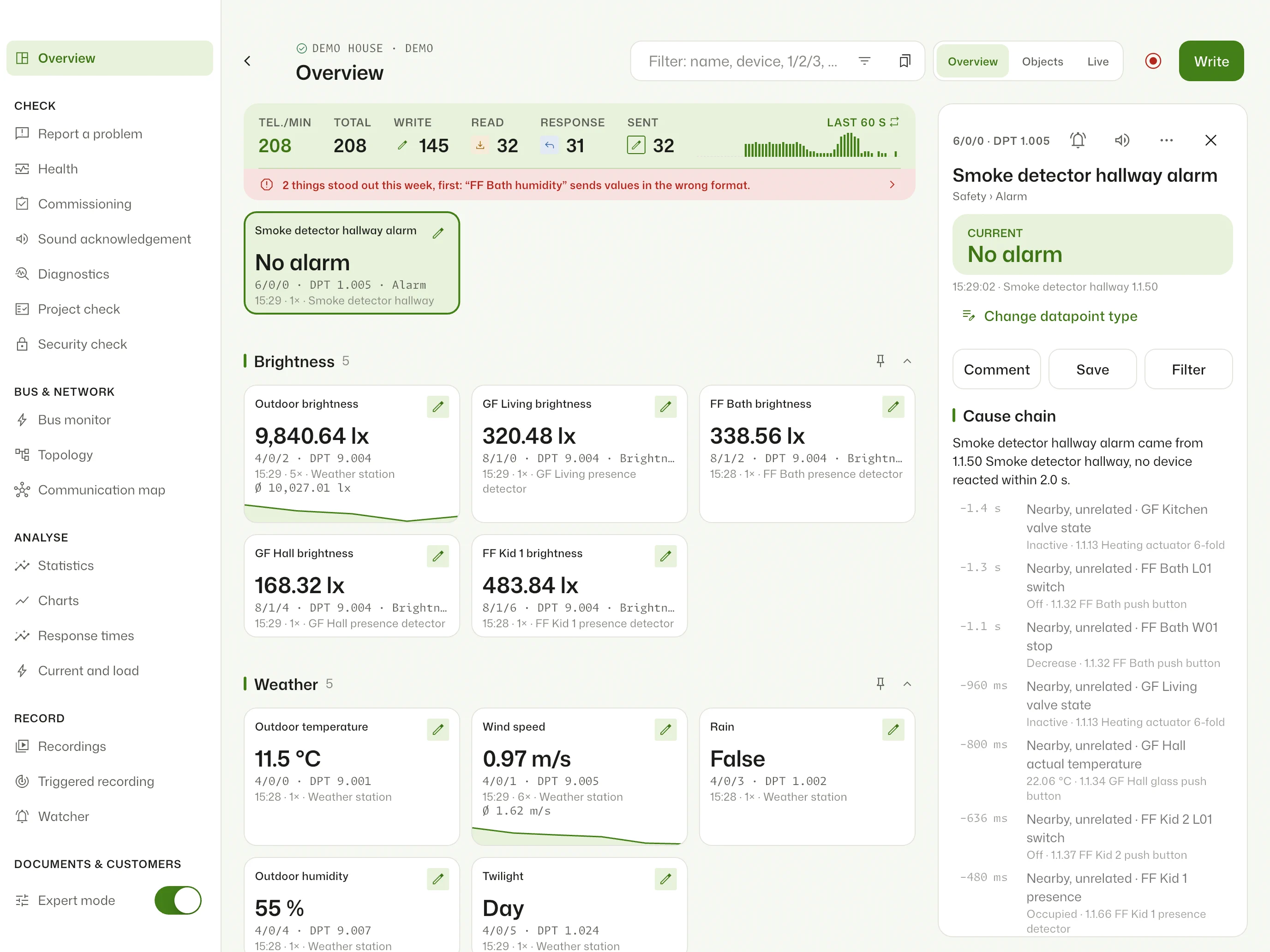
- Telegrams
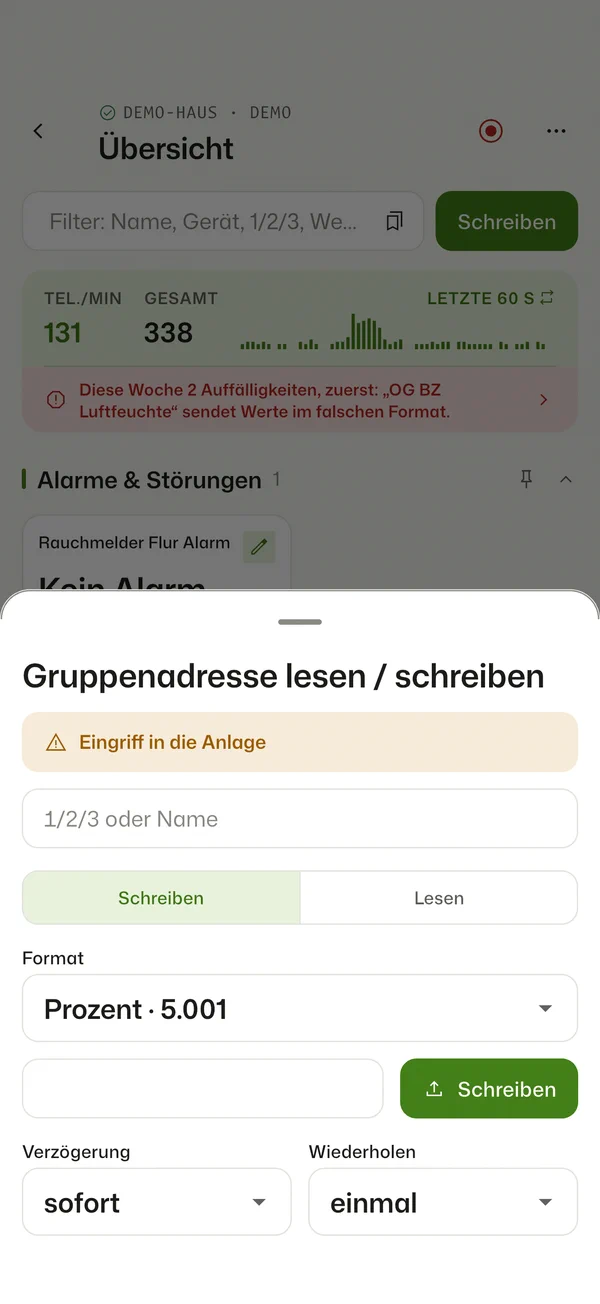
- Live with source, destination and value; search, filter, read and write values. Writing is an intervention in the installation and is your responsibility
- ETS project
.knxprojup to ETS6, password-protected too: names, datapoint types, devices and rooms- Overview
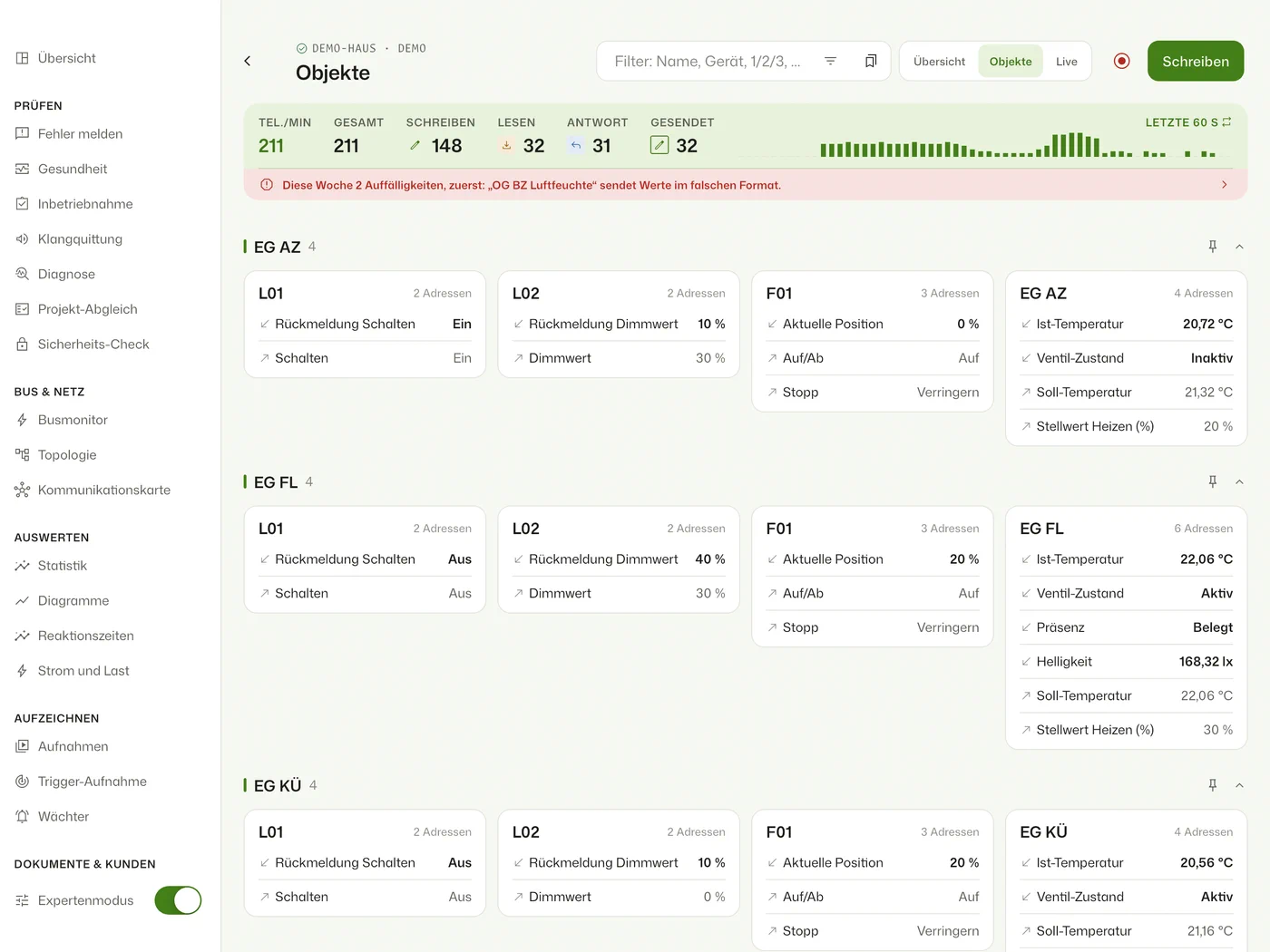
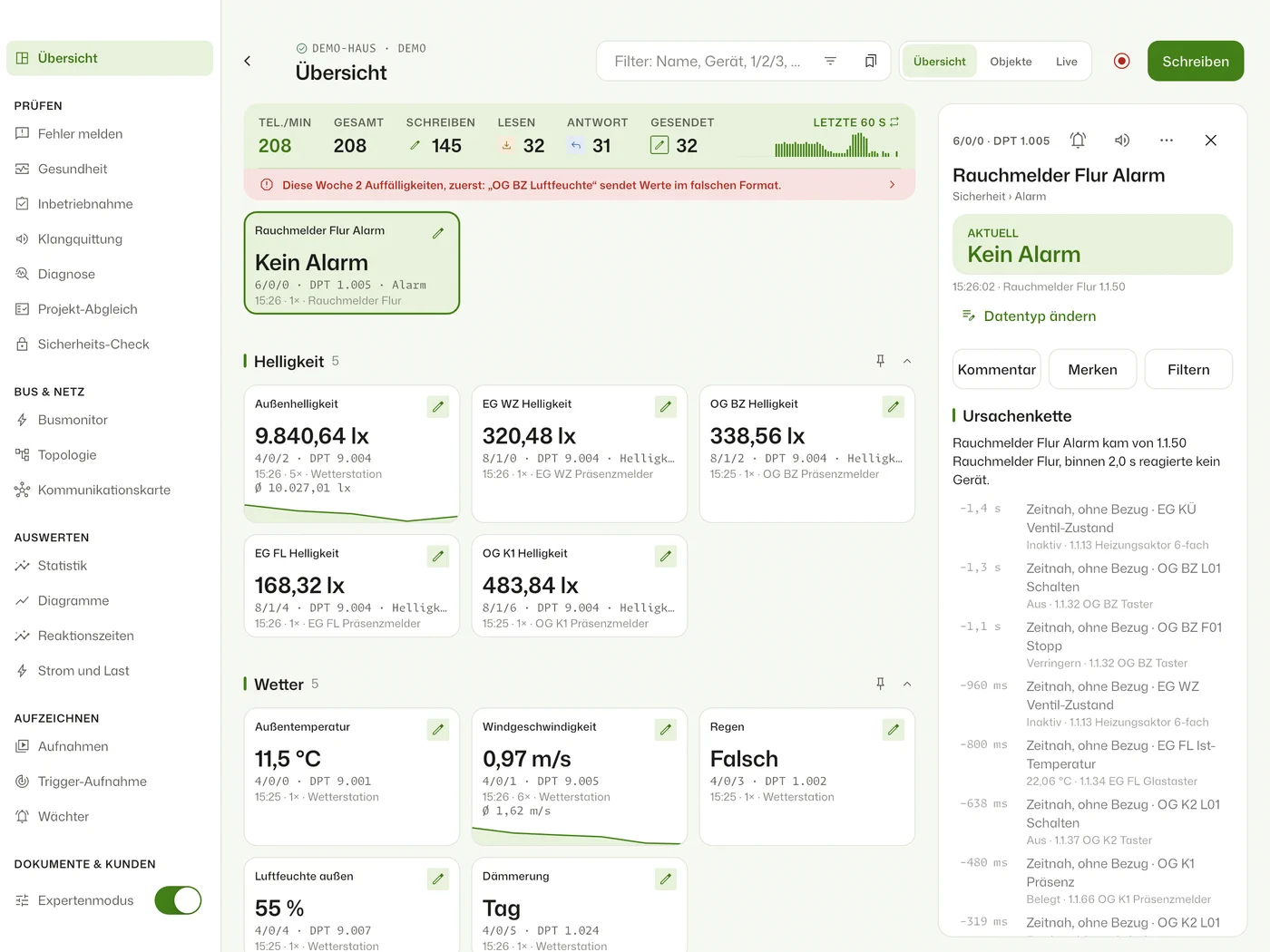
- Every group address with its value and a mini history, by rooms and functions
- Objects
- Actuators as DIN rail devices with channel LEDs, like above
- Health
- Silent devices, cycles, datapoint types and bus quality, with a PDF report
- History
- Continuous recording day by day, recordings with a timeline per group address
- Comments
- On telegrams, charts and recordings, with screenshots; “Report a problem” records when the fault happened
- Exports
- One page for PDF, CSV, ETS file, reports and a ZIP with everything
- Experts
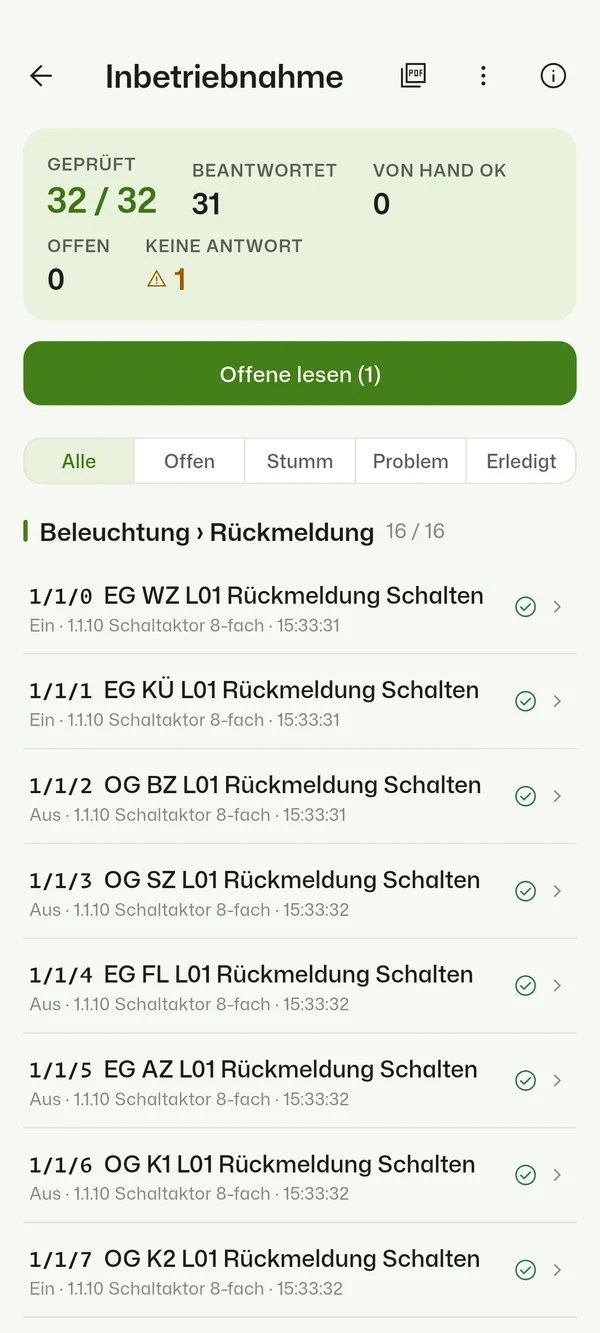
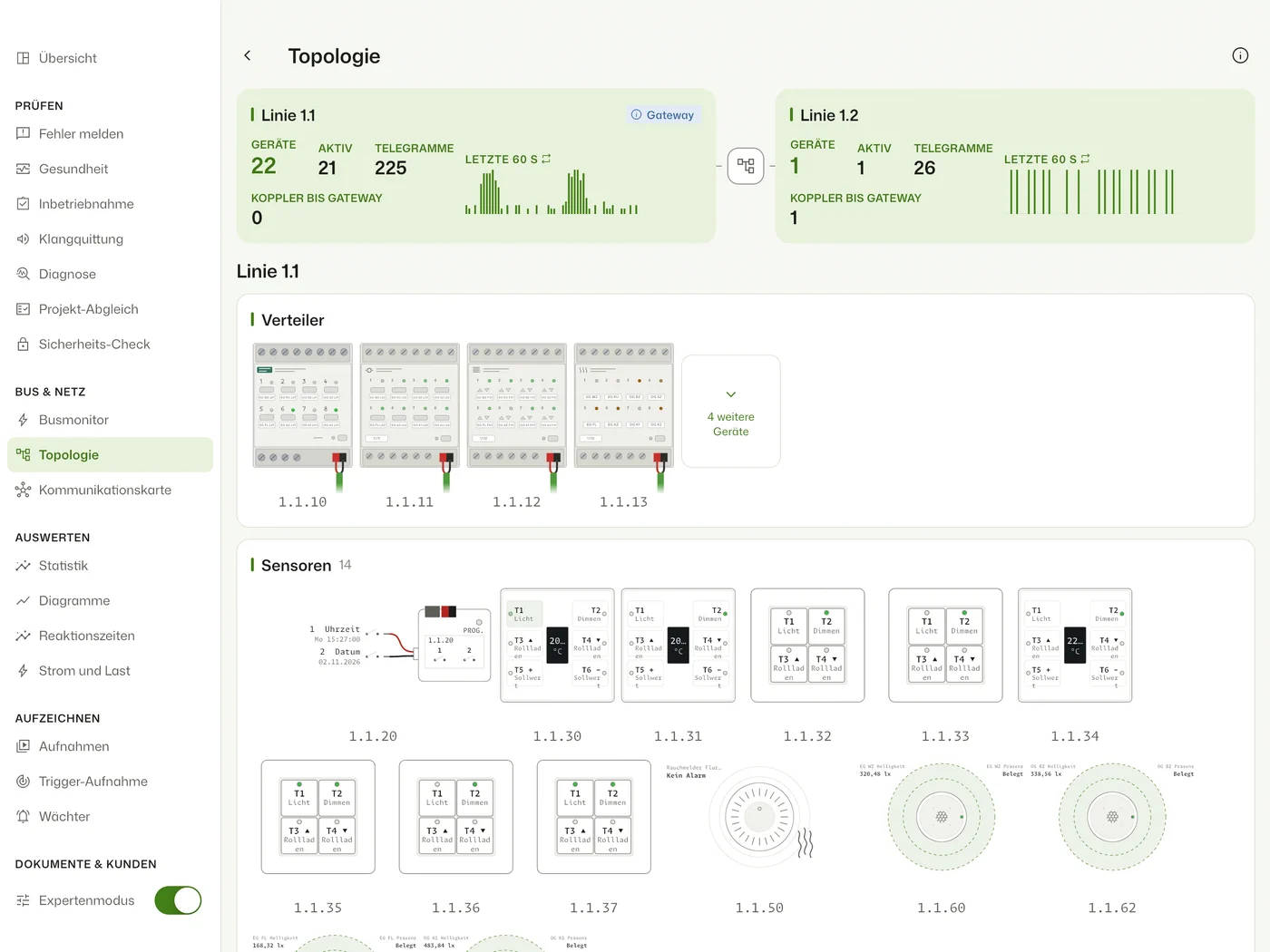
- Bus monitor with raw frames, topology, comparison with the ETS project, commissioning checklist
- Connection
- Tunneling, routing and KNX IP Secure
- Home Assistant
- Read-only by default; integration with sensors, triggers and repair hints, events, blueprints and MQTT
Soon without Home Assistant too, right at the gateway.
For the building site, the distribution board and the office next to ETS: the same tools as an app on whatever device is in your hand.
- Mobile
- iPhone, iPad and Android
- Desktop
- Mac and Windows, Linux today
- Connection
- Directly to your IP interface or IP router
- On site
- ETS project and recordings live on the device, no internet needed
At home in Home Assistant first, then out on the building site too.
The add-on is ready and stays free, the Linux app is available today, and iPhone, iPad, Mac and Android are in beta. The other apps are built and follow in the coming weeks.
Everything is still free in the beta: you use all features at no cost, including those of Plus and Pro. As a thank-you, you get 90 days of Pro on first launch of the store version, on the device you used the beta on. How to join
- Free
- FreeFor a look at your own installation
- Plus
- €24.99 a yearor €79 once · long-term history, charts, watchers, export
- Pro
- €149 a yearor €14.99 a month · bus monitor, topology, diagnostics, commissioning
Suggested prices as a non-binding preview, nothing can be bought yet. Final prices apply in the App Store and on Google Play; on iPhone, iPad and Mac one purchase works everywhere.
- Open
- Source code under GPLv3 on GitHub: everything for beginners and advanced users in the app, add-on and Busclear Box, open to check and to change
- Now
- Home Assistant add-on and Linux (download), both free for one installation, for good
- Beta
- iPhone, iPad and Mac through TestFlight, open to everyone, with every tool
- Beta
- Android on Google Play: first join the Google group, then join the test. Open to everyone, with every tool
- Soon
- Windows as a download
- Preview
- Home builder package: from everyday wishes through room book and floor plan to documents for your electrician. Learn more
- Preview
- KNX box: a Raspberry Pi as an on-site telegram recorder, recording for days on the building site, without Home Assistant and without internet. Until the other apps arrive, set it up with the Linux app
- Apps
- Free to use, more tools with Plus and Pro. Everything is free in the beta.
Everything you need on the bus.
Without expert mode the app stays lean: the values, the telegrams and a check of your installation.
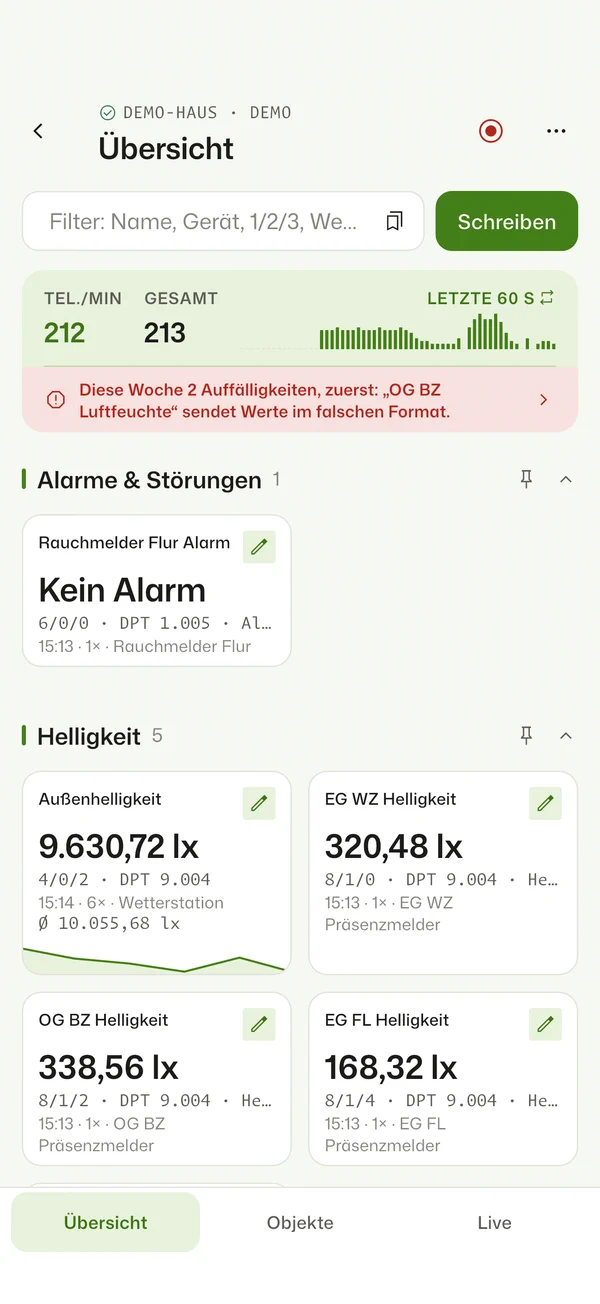
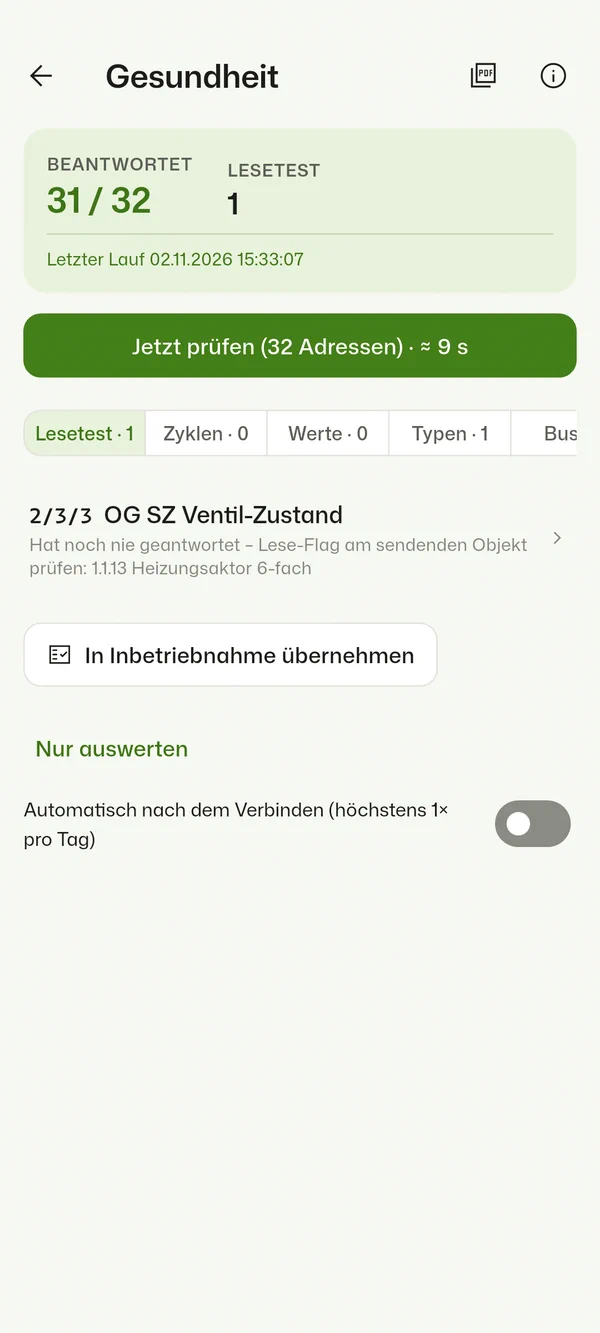
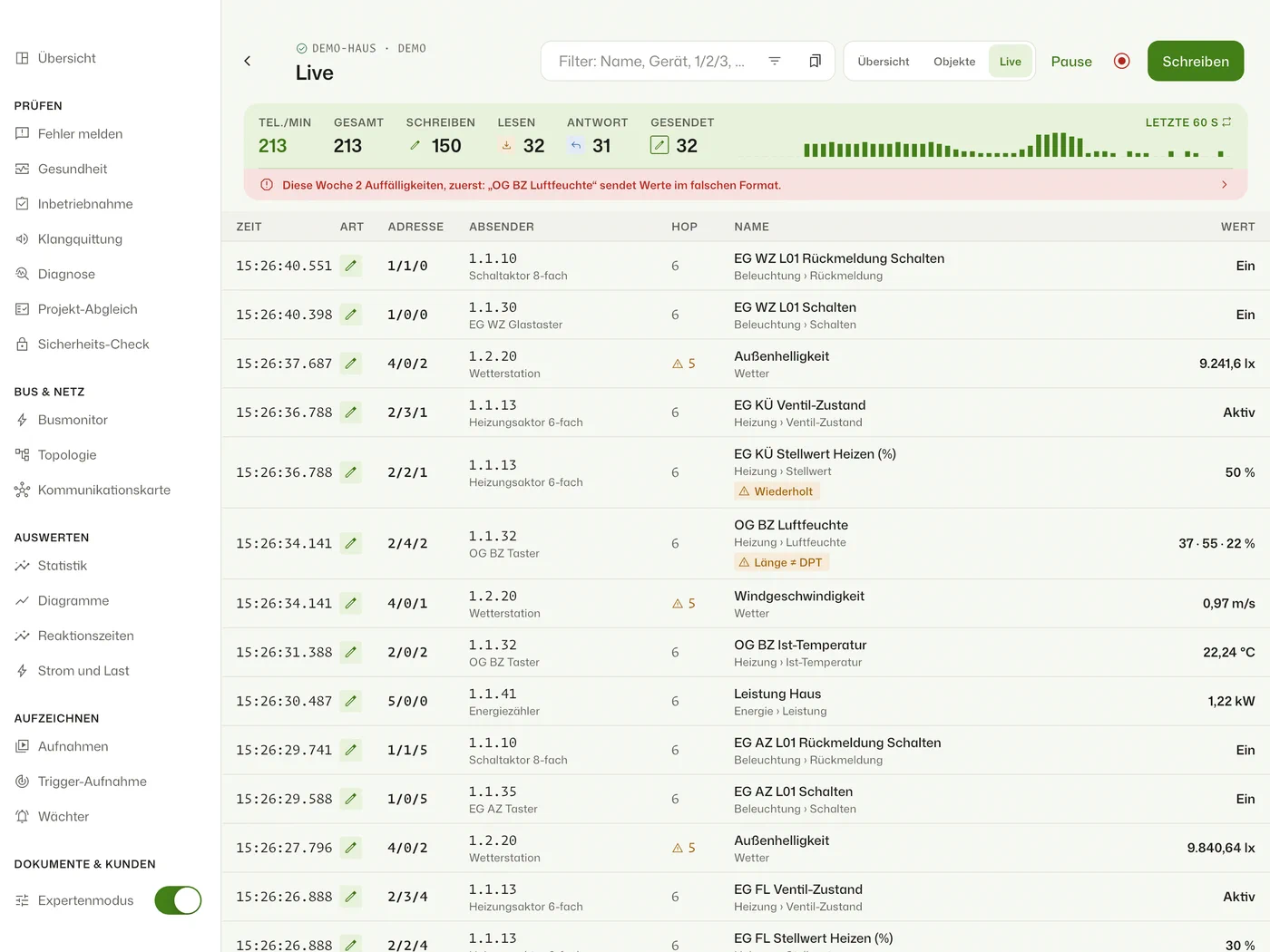
- Overview
- Overview & favourites. Every group address as a card with its current value and a mini history, sorted by the rooms and functions of your project. Charts are saved per installation and get their own section on the overview.
- Telegrams
- Live telegrams. Every telegram with sender, destination, value and anomalies. Search in the title bar, one filter button with counts, read and write values. Writing is an intervention in the installation and is your responsibility.
- Objects
- Rooms & objects. Commands and feedbacks grouped automatically, actuators drawn as DIN-rail devices with channel LEDs.
- Health
- Health. Reads status addresses, reports devices that went silent and checks cycles, values, datapoint types and bus quality. With a PDF report.
- Recordings
- Recordings & history. Record with a name and note; a long press keeps the last 10 seconds. Before a replay, change values, remove telegrams, save as a copy; replay with a timeline per group address, 1–60×. Also long-term history and statistics with an activity heatmap.
- Secure
- KNX Secure & routing. Tunnel over UDP or TCP, routing via multicast, KNX IP Secure and Data Secure with the keyring from ETS.
- Comments
- On telegrams, charts and recordings, with up to three screenshots
- Exports
- One page for everything: telegrams as PDF, CSV and for ETS, reports and a ZIP with everything
- Bug report
- Report a problem: reproduce the fault, tap each time it happens, and the diagnostic package goes to your electrician; opened, it shows findings and hints. For support optionally without names
- Getting started
- Teach in without an ETS project: press a button, name it, done. Without expert mode the live list shows every telegram as a sentence; plus connection help, a status light with weekly report and “Learn KNX”
- Backup
- Everything in one file with its own password, in the apps from version 1.9.1
- Demo
- Demo house to try it without a KNX system
- Languages
- German and English
One switch, and the whole workshop is there.
For commissioning, troubleshooting and handover. Turn expert mode on on the connect screen or at the bottom of the menu; in the Home Assistant add-on it is on from the start. Without it nothing is lost, the tools just stay out of the way. Try every tool in the demo house.
- Bus monitor
- Raw frames with ACK/NAK, repeats and bus load
- Checklist
- Commissioning: a checklist of all status addresses, answers are checked off, PDF report with a signature field
- Diagnostics
- Read status, find programming mode, check addresses, scan lines
- Topology
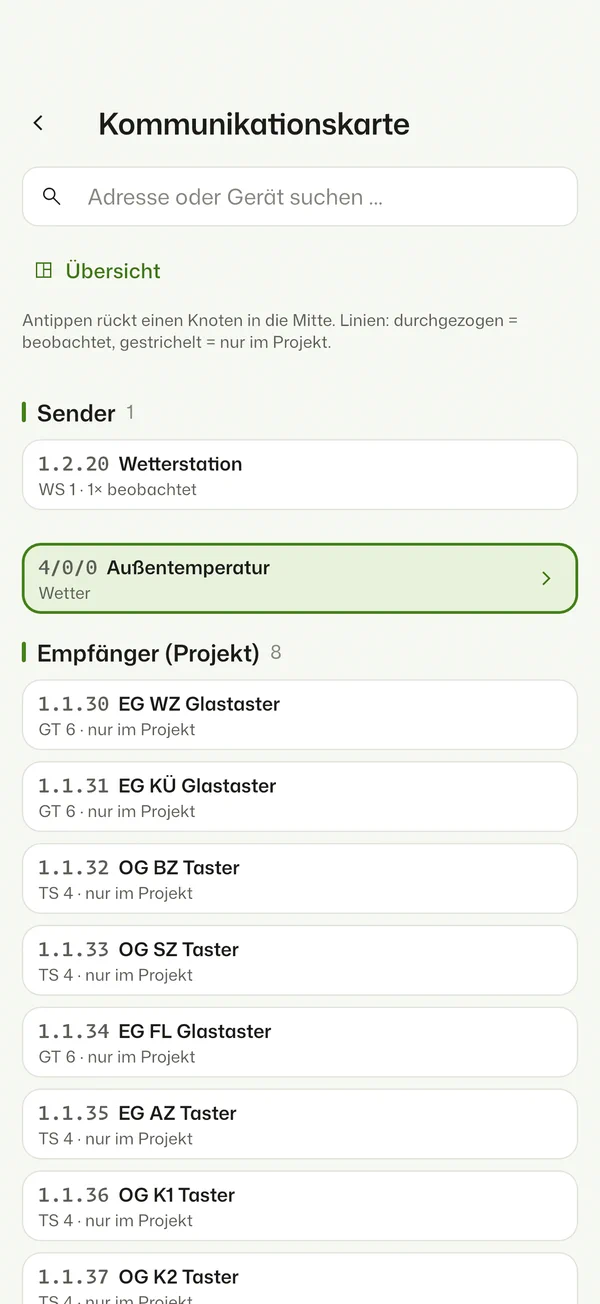
- Map and topology: who talks to whom, lines, couplers and coupler traffic, tunnels
- Compare
- Bus traffic against the ETS project: what is missing, what is unknown, what never sends; plus the object flags (T, R, C) even without bus traffic
- Charts
- Up to eight addresses, one axis per unit, saved per installation
- Trigger
- Trigger recording for sporadic faults: starts on a value, a fault, a repeat or an unanswered read, with pre-roll
- Send
- Like the ETS group monitor: delayed and cyclic, more datapoint types (text, time, date, colour …), set a datapoint type per address
- Replay
- Play a recording onto the bus: choose addresses, change values, shorten pauses, then confirm explicitly
- Hop count
- Its own column in the live list, a hint on unusual routing counters, installation location next to the sender
- Connection
- Port, tunnel address, connection options and keyring right on the connect screen
- Alarms
- Alarm notifications as soon as an alarm or fault object fires
- Acceptance
- Ring-through with sound acknowledgement and an acceptance report signed on the device
- Fault hunt
- Catch sporadic faults over days, with the KNX box
- Photo docs
- Photos of the distribution board and labels with QR codes, per installation
Your project makes telegrams readable.
Import your ETS project (.knxproj, password-protected too) or the group address CSV export. Busclear picks up names, datapoint types, devices, rooms and links. 1/2/3 becomes “Living room ceiling light – On”.
- 1/2/3
- Living room ceiling light – On On
- 1/2/4
- Living room ceiling light – Status On
- 3/1/10
- Kitchen temperature actual 21.4 °C
- 2/0/7
- Bathroom blind position 35 %
- 4/0/1
- Meter active power 1.82 kW
Straight to your IP interface.
Connects via KNXnet/IP to your IP interface or IP router, KNX Secure included. You need no account, and your installation data only leaves your network if you share it yourself.
- KNXnet/IP
- Tunnelling, routing and KNX Secure
- .knxproj
- ETS projects incl. password-protected ETS6
- 0
- Trackers; no account, project and telegrams stay with you
A Raspberry Pi that listens in on site.
The KNX box records for days, without Home Assistant and without internet, and opens its own Wi-Fi. You set it up with the app: scan the QR code on the label, the app does the rest. Setup, connection, recording: all about the KNX box
- Setup
- Scan, and the app joins the Wi-Fi, pairs, sets the clock and finds the gateway
- App
- Without the app only the browser is left. Until iPhone, iPad and Android arrive, pair the box with the Linux app
- Connection
- A network cable to the IP gateway, or straight on the line with the kBerry plug-on module, then no gateway
- Clock
- Without internet: from the iPhone or iPad, or from the KNX time master on the line
- Recording
- Around the clock, for days; app and box share the project and the history
- Status
- Preview Image for the Raspberry Pi
Your data stays yours.
Busclear works on your network and stores on your devices. We have hardened the systems considerably, and the control stays with you: you need no account, and the app does not send your project, telegrams or keys to anyone on its own. Read the privacy policy
- Local
- Project, telegrams, recordings and keys are on your device, your box or your Home Assistant, not with us. Your ETS project password is not stored
- Tracking
- No analytics or advertising libraries, no tracking
- Encrypted
- From version 1.9.1 the apps encrypt their files with AES-256-GCM, with the key in the system keychain. Without a usable keychain (Linux without libsecret), and for settings such as the gateway, data stays unencrypted; the add-on and the box do not encrypt their files themselves
- App lock
- Optional, with Face ID, fingerprint, Windows Hello, device code or an app password plus recovery key as PDF. It helps if the device falls into the wrong hands, not against malware under your user account
- Backup
- In the apps: everything in one file with its own password, in a format that is openly described. Nobody can reset the password, not even us
- No internet
- The add-on and the box need no internet. Data only goes to destinations you set up yourself
- Network
- The app talks to your gateway and your KNX box. Exception: on Android the QR scanner sends technical data to Google ML Kit, never the camera image
You help decide what comes next.
Planned features are open issues on GitHub, with goal, scope and open questions. Before something gets built, what counts is who would actually use it. A 👍 is a vote; a comment about your installation often helps even more. All issues on GitHub
- Vote
- See planned features and give a 👍 to what you need. The most wanted come first.
- Join in
- Tell us in a comment how you work today and which devices you use. That often shapes the scope, and sometimes leads to a test with your installation.
- Suggest
- Something missing or not working? Report a bug or request a feature.
- Open right now
- For example DALI lighting through KNX, a native ioBroker adapter or every telegram to MQTT, which you can already test as a preview.
- Please don't
- attach ETS projects or full recordings in public: they can contain addresses, room names and passwords. A short excerpt as text is enough.
Frequently asked questions
Can I try the app without a KNX system?
Yes. “Try the demo without a KNX system” on the start screen opens a sample house with a project and live values. Your own project stays untouched.
Which KNX interfaces are supported?
Any KNXnet/IP interface or IP router, for example a Gira X1. Tunnelling works over UDP or TCP; with an IP router you can also use routing, which needs no tunnel (not yet on iPhone and iPad, where multicast needs approval from Apple). The app does not support USB and serial interfaces; the KNX box can connect the bus line directly through the kBerry plug-on module.
Why can't I connect although the interface is reachable?
IP interfaces only offer a few tunnels, often four or fewer. If visualisation, ETS or other apps use all of them, the interface refuses. Free a tunnel, configure an additional one in ETS, or use routing.
Is KNX Secure supported?
Yes: KNX IP Secure for the tunnel and KNX Data Secure for encrypted group addresses. Import the keyring (.knxkeys) from ETS. The keys are kept in your device’s keychain. If something doesn’t work with your interface, please report it on GitHub.
How do I back up my data, and who can get at it?
From version 1.9.1 the app can save everything from this device into one file with its own password (at least 12 characters). It stays wherever you put it, and nobody can reset the password, not even us. Not included are the app lock and the history on a box. Details are in the privacy policy.
Do I need an ETS project?
No, the bus monitor works without one, and you can teach in your installation without ETS. With a project you get names, datapoint types, rooms and better checks. The password of a protected project is only used during import and is not stored.
How do I get the desktop version?
Linux does everything the iPad app does. The download is in the GitHub release. Windows follows in the coming weeks; on the Mac, Busclear comes through the App Store.
What do I need for the KNX box?
A Raspberry Pi 4 (tested) or 5, ideally with a USB SSD and a real-time clock (Pi 5: battery), an IP gateway or the kBerry plug-on module, plus the app: on iPhone, iPad and Android in the coming weeks, on Linux today. The box also sets its clock from the iPhone or the KNX time master. The ready-made image is in the GitHub releases, everything else on the KNX box page; it is a first preview.